


Page 47 - Circular Connector Backshells and Accessories
P. 47
Banding System Shield Termination Tools                                                       How  to Order


               Tools provide the user with consistent, repeatable back-  3.  Mount holder on square drive of torque wrench.
               shell installations.  Designed primarily for production  Carefully mate with connector, and hand-tighten
               assembly use, the tools can also be used equally well  Glenair backshell coupling.  To assure proper mat-
               for successful field maintenance operations.          ing, anti-rotation teeth must be fully engaged.
                  Glenair Backshell Assembly Tools may also be uti-  4.  Tighten rotatable coupler with assembly tool.
               lized effectively with backshell rotatable couplers pro-  Do not use excessive grip on handles.  When cou-
               duced by other manufacturers, providing the "B" refer-  pler begins to tighten, relax grip and rotate assem-
               ence diameters are consistent with Glenair values.    bly tool back 90°, then resume grip and continue

               Recommended Tightening Procedures                     to tighten; repeating this sequence until desired
                  Recommended tightening procedures, tools and       torque level is reached.
               torque values offered by Glenair are intended as an aid
                                                                      CAUTION: Do not apply torque in excess of
               to properly fasten the backshell to the connector inter-  signal setting. Excess torque will cause signal
               face threads.  Glenair offers a variety of tools to accom-  pointer to reset and give erroneous readings.
               plish proper tightening; our 600 Series pliers with re-
               placeable pads are configured to make maximum cir-
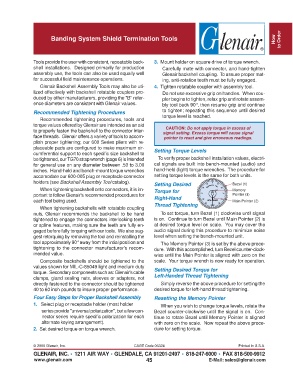
               cumferential support to each specific size backshell to  Setting Torque Levels
               be tightened, our TG70 strap wrench (page 6) is intended  To verify proper backshell installation values, electri-
               for general use on any diameter between .50 to 3.00  cal signals are built into bench-mounted (audio) and
               inches.  Hand-held and bench-mount torque wrenches  hand-held (light) torque wrenches.  The procedure for
               accomodate our 600-005 plug or receptacle connector  setting torque levels is the same for both units.
               holders (see Backshell Assembly Tool catalog).    Setting Desired                  Bezel (1)
                  When tightening backshell onto connectors, it is im-  Torque for                Memory
               portant to follow Glenair's recommended procedures for                             Pointer (3)
               each tool being used.                             Right-Hand                       Main Pointer (2)
                  When tightening backshells with rotatable coupling  Thread Tightening
               nuts, Glenair recommends the backshell to be hand    To set torque, turn Bezel (1) clockwise until signal
               tightened to engage the connectors interlocking teeth  is on.  Continue to turn Bezel until Main Pointer (2) is
               or spline features, making sure the teeth are fully en-  at desired torque level on scale.  You may cover the
               gaged before fully torquing with our tools.  We also sug-  audio signal during this procedure to minimize noise
               gest retorquing by removing the tool and reinstalling the  level when setting the bench-mounted unit.
               tool approximately 90° away from the intial position and  The Memory Pointer (3) is set by the above proce-
               tightening to the connector manufacturer's recom-  dure.  With this accomplished, turn Bezel counter-clock-
               mended value.                                     wise until the Main Pointer is aligned with zero on the
                  Composite backshells should be tightened to the  scale.  Your torque wrench is now ready for operation.
               values shown for MIL-C-85049 light and medium duty
               torque.  Secondary components such as: Glenair's cable  Setting Desired Torque for
               clamps, gland sealing nuts, sleeves or adapters, not  Left-Handed Thread Tightening
               directly fastened to the connector should be tightened  Simply reverse the above procedure for setting the
               40 to 60 inch pounds to insure proper performance.  desired torque for left-hand thread tightening.
               Four Easy Steps for Proper Backshell Assembly     Resetting the Memory Pointer
               1.   Select plug or receptacle holder (most holder   When you wish to change torque levels, rotate the
                  series provide "universal polarization", but a few con-  Bezel counter-clockwise until the signal is on.  Con-
                  nector series require specific polarization for each  tinue to rotate Bezel until Memory Pointer is aligned
                  alternate keying arrangement).                 with zero on the scale.  Now repeat the above proce-
               2.  Set desired torque on torque wrench.          dure for setting torque.


               © 2005 Glenair, Inc.                      CAGE Code 06324                             Printed in U.S.A.
               GLENAIR, INC. • 1211 AIR WAY • GLENDALE, CA 91201-2497 • 818-247-6000 • FAX 818-500-9912
               www.glenair.com                                45                        E-Mail: sales@glenair.com

